Found myself tasked with reverse-engineering the Duo Pop appcessory this week. In case you’re wondering, base-station to iPad communication is handled via ultrasonic sound.
EOM.
b.
Found myself tasked with reverse-engineering the Duo Pop appcessory this week. In case you’re wondering, base-station to iPad communication is handled via ultrasonic sound.
EOM.
b.
I thought I’d share this little nugget, since it’s not very well covered within the tomes of the intertubes.
I was using PhoneGap and SenchaTouch to create a native iOS app. The app required a local form to be posted to a remote server. I couldn’t use Sencha Touch’s built-in AJAX functionality, since the aformentioned remote service expected its data to be in a custom format. I had to roll my own using the Javascript XMLHttpRequest method.
But that’s beside the point, as I believe you’d encounter this gremlin even when using the methods built into Sencha Touch.
Anyhoo. The problem surfaces when the app tries to make an AJAX request using the HTTPS protocol. Turns out that if the remote site’s SSL certificate is anything less than 100% valid (self-signed, problem in the trust chain, etc) PhoneGap will simply abort the request with an http status code of 0. I spent a while trying to find a javascript workaround, but none was to be found.
There is a solution by Aaron Saunders floating around the intertubes. He wrote it back in 2010 and it has (as he admits) plenty of typos. I spent a little bit of time bringing the code up to date and so I thought I’d share my updates to his code. Most of it has to do with ditching the deprecated <PhoneGapCommand> PhoneGap class and switching over to using the new <PGPlugin> class.
Note: I call this a workaround, not a solution. This workaround tells iOS to make the connection & disregard any problems it might find with the security cert. THIS CAN BE A BAD THING! I recognize the pitfalls and I consider the workaround acceptable FOR ME, since the final apps will be installed on a small controlled population, and we’re not transferring any private data. You can’t (and shouldn’t) hold me liable for any problems you might have resulting from the use of this code. Know the risk, and use at your own risk.
PixAuth.h
//
// PixAuth.h
// phoneGap1
//
// Created by Aaron saunders on 8/25/10.
// Copyright 2010 clearlyINNOVATIVE. All rights reserved.
// Modified 2011 by briankiel.
// #import
#import <PhoneGap/PGPlugin.h>
@interface PixAuth : PGPlugin {
NSURLConnection *aConnection;
NSURLResponse *connectionResponse;
NSMutableData *connectionData;
}
- (void)loginWithBadCert:(NSMutableArray*)params withDict:(NSMutableDictionary*)options;
@end
PixAuth.m
//
// PixAuth.m
// phoneGap1
//
// Created by Aaron saunders on 8/25/10.
// Copyright 2010 clearlyINNOVATIVE. All rights reserved.
// Modified 2011 by briankiel.
#import "PixAuth.h"
@implementation PixAuth
-(void) loginWithBadCert:(NSMutableArray*)params withDict:(NSMutableDictionary*)options {
// modified this script from its original version, as the new version of phonegap.exec passes the arguments starting at index 1
// index 0 contains the plugin.method being called.
NSLog(@"in loginWithBadCert. url is: %@", [params objectAtIndex:1]);
NSURL *serverURL = [NSURL URLWithString:[NSString stringWithFormat:@"%@",[params objectAtIndex:1]]];
NSLog(@"url is: %@", serverURL);
NSURLRequest *connectionRequest = [NSURLRequest requestWithURL:serverURL
cachePolicy:NSURLRequestReloadIgnoringCacheData timeoutInterval:60.0];
NSURLConnection * aConnection = [[NSURLConnection alloc] initWithRequest:connectionRequest delegate:self];
connectionData = [[NSMutableData alloc] init];
}
/* NSURLConnection Delegate Methods */
- (void)connection:(NSURLConnection *)connection didReceiveResponse:(NSURLResponse *)response {
NSLog(@"in didReceiveResponse ");
[connectionResponse release];
connectionResponse = [response retain];
[connectionData setLength:0];
}
- (void)connection:(NSURLConnection *)connection didReceiveData:(NSData *)data {
NSLog(@"in didReceiveData ");
[connectionData appendData:data];
}
//
// this method, and the one below get the magic rolling and allow my ajax request
// to function as expected, even with the bogus certificate
//
- (BOOL)connection:(NSURLConnection *)connection canAuthenticateAgainstProtectionSpace:(NSURLProtectionSpace *)protectionSpace {
return YES;
}
//
// my application requires credentials, so they are stored in the application settings
//
- (void)connection:(NSURLConnection *)connection didReceiveAuthenticationChallenge:(NSURLAuthenticationChallenge *)challenge {
NSLog(@"in didReceiveAuthenticationChallange ");
NSURLCredential *newCredential;
newCredential = [NSURLCredential credentialWithUser:[[NSUserDefaults standardUserDefaults] stringForKey:@"emailAddress"]
password:[[NSUserDefaults standardUserDefaults] stringForKey:@"password"]
persistence:NSURLCredentialPersistenceNone];
[[challenge sender] useCredential:newCredential
forAuthenticationChallenge:challenge];
}
- (void)connectionDidFinishLoading:(NSURLConnection *)connection {
NSLog(@"in connectionDidFinishLoading ");
NSString *string = [[[NSString alloc] initWithData:connectionData encoding:NSUTF8StringEncoding] autorelease];
NSLog(@"%@", string);
}
- (void)connection:(NSURLConnection *)connection didFailWithError:(NSError *)error {
NSLog(@"in didFailWithError ");
NSLog(@"Unresolved error %@, %@", error, [error userInfo]);
}
- (NSCachedURLResponse *)connection:(NSURLConnection *)connection willCacheResponse:(NSCachedURLResponse *)cachedResponse {
return nil; // Never cache
}
@end
Place the two files above in your PhoneGap “plugins” folder, and make sure you add the plugin to your phonegap.plist file in xCode.
Then just add the following line to your “onDeviceReady” javascript method:
PhoneGap.exec(onSuccessHandler, onErrorHandler, "PixAuth","loginWithBadCert",["https://your.domain.with.a.bad.cert"]);
And you’re ready to roll.
Use it wisely.
I have a new source of time-suckage, and its name is the Kinect.
Back in December, someone hacked Microsoft’s Kinect.. allowing computers to interface and receive raw data from the full-body motion/gesture sensing device. A week or two ago, in early January, another group created an AS3 solution. The solution consists of a command-line socket server (which acts as a bridge between the Kinect and the client Flash application) and an AS3 codebase containing a lot of the basic Kinect control/data-processing routines.
I debated for a short period of time about picking up a Kinect and joining the hackathon. Now, it should be said that a) I don’t have an Xbox and b) I know very little when it comes to actual hardware-level hacking, but neither of those two stopped me as I proceeded to purchase a Kinect, bring it home, and park it on my desk next to my MacBook Pro.
I’ve now set up as3-server (the command-line Kinect connector) and have been playing with OpenKinect and the OpenKinect AS3 API. I’m still trying to figure out what I can and should do with this beast, but nevertheless I’m super-giddy about it.
Working on creating an x/y/z visual representation of the data coming from the Kinect. Basically taking the data stream from the RGB camera, but adjusting the z-index of the individual pixels, placing them in the appropriate z-space. (thus creating a realtime 3d model of the scene). (inspired by this clip… I think the guy here is using something other than Flash for his visualization). Running into difficulties. In order to control z-index of parts of the image, I’m creating an array (actually vector) of sprites… one for each pixel in the video frame. Currently unable to handle more than 1/10 of the video frame without latency becoming a problem OR Flash just choking in general. Going to have to optimize my methods.
Moved instantiation of the sprite vector to coincide with instantiation of the general app. Created another vector to contain depth frame information (updated as information is received from the depth camera). So, on frame updates, all that Flash has to worry about doing is setPixel on the bitmap data for each sprite (to show the proper image), and adjusting the z property for that sprite, depending on what’s being returned by the depth camera. With these optimizations, I’ve been able to increase frame sampling to 1/4 of the full frame. Latency issues still loom, and it looks like there’s a mismatch between video and depth data. I think that this is due to a difference in the resolutions of the depth and rgb cameras. Investigating that now. Anyone know offhand what the resolution for each is? I’ve recorded a sample screen video.
3d Kinect output in Flash – trial 1/15/2011 11:30
Worked around performance issues for now… Increased the size of the sprites from one pixel to five (squared). I’m copying a 5×5 pixel block to each sprite & adjusting the depth according to a single pixel (from the depth camera stream) within that block. This has allowed me to run a full-frame sample with very little lag. (before I was running a partial – 1/5 frame sample – and it was very laggy). Test video posted here.
Just mostly been working on bringing the depth & rgb cameras into sync. Not sure if it’s a difference in the cameras or something odd in my bitmap sampling/drawing methods. Been trying to track that down. Also figured that I should make the individual sprites’ rotationY the inverse of the container rotationY in order to display it properly. Another test video here.
Before getting out of bed this morning, I laid there, thinking that maybe I was going about things the wrong way. That maybe I should steer clear of Flash’s native 3D, and use one of the multiple 3D Flash engines that have popped up over the years.
After getting up, feeding the animals, and brewing some coffee, I set about porting what I’d done on Saturday over to using the Away3D Flash engine. Results of initial tests led me to be optimistic. After a well-needed three-hour midday break from dev, I settled back into my seat and recorded this test video. The bitmap mesh was cut to an array of something near 100×100 vertices. So, while it’s nowhere near super-fine it’s enough to hopefully show depth differences.
As viewable in the video, I’m now running into troubles with retrieving multiple levels of depths. I think this is mostly because I’ve been basing my depths on the color values of a bitmap generated from the depth camera stream. I really want to process the depth camera stream’s byte array directly, but I can’t seem to track down any notes when it comes to the format of the depth camera stream’s byte array. Is it unsigned? is it bytes or ints or floats or shorts?
More to follow.
[[A lot of this is stream-of-consciousness and has, as of yet, to be organized into a proper form... expect updates & edits in the next few hours/days....]]
Word of warning: In the article that follows, I will use “GSM” and “CDMA” as descriptors for phones and networks. I realize that AT&T’s 3G network is actually UMTS/HSPA, and Verizon’s 3G network is EV-DO, but since each 3G network is built on a 2G network (and those two network flavors are incompatible) to keep things simple I’ll be using the 2G network’s descriptor when referring to carriers and iPhone flavors. That is all. You may proceed.
Well, it’s finally here. People have been talking about and pining for a fabled Verizon iPhone for years, and today Verizon announced that it will, in fact, be released in early February.
Unlike other Apple announcements (but similar to other times when the iPhone is released for a second carrier in a given market) Steve Jobs was not present. So there were no rainbows, no unicorns, no fuzzy kittens romping and tugging at your heartstrings. Just Apple’s Tim Cook and (Will Farrel as Alex Trebek doppelganger) Dan Dee from Verizon excitedly showing a phone that cosmetically looks the same, and apart from the CDMA radio, possesses all of the same features.Shortly thereafter my Facebook and Twitter feeds exploded with friends and other people’s AT&T breakup notes.
But I’m staying put… for now. And for those dropping AT&T for the Verizon pastures, I bid you fair travels.
My reasoning? One word. CDMA.
The new Verizon iPhone will use the CDMA wireless protocol and will NOT contain an LTE radio. (apparently squeezing an LTE radio in to the current design was a little too challenging for Apple engineers)
Allow me to take a moment to explain the importance of wireless protocols when it comes to actual user functionality…
GSM (the 3G protocol used by AT&T) and CDMA (the 3G protocol used by Verizon) treat the voice/data divide differently. With GSM, both data and voice share the same frequency, and are carried by the same signal, whereas with CDMA voice and data are treated separately and the phone switches frequencies depending on the content being transmitted (whether it be data or voice). This means that when a CDMA device is transmitting voice, it doesn’t transmit data (and vice-versa).
Not to mention that, like other CDMA devices, there’s no SIM card. If you were used to swapping around SIM cards at your leisure, it’s not going to happen here. (but that’s nothing new, I’ve yet to see a CDMA phone with a user-accesible SIM card.)
A lot of people don’t realize precisely HOW they’re using their devices, and how they just assume that data is always available.. that the internet is always just a click away on their phone.
There’ve been countless times when I’ve been on a conference call (on my iPhone) and found myself sending the call to the background while I check email.. or look up something on wikipedia… or send a picture over to another person on the call. When the iPhone was first released, Steve Jobs described the iPhone as an “iPod and internet and phone” Notice the “and”s in that description because it’s important. In order to break down the difference between a GSM iPhone and a CDMA iPhone let’s write that descriptive phrase down using boolean logic…
GSM iPhone: (iPod && internet && phone)
CDMA iPhone: (iPod && (internet || phone)
So it’s an “or” instead of an “and”. No biggie. But that’s where the mental clash is going to happen with a lot of the people who have been using iPhones for years. The transition between using voice and using data has become seamless to them (myself included). The first time (and every time) that you try to multitask and use your CDMA iPhone in the same manner, it just won’t do it.
A nice feature that Verizon announced for their iPhone is that you’ll be able to (via WiFi) use it as a sort of 3G modem for up to five other devices. It’s a feature that’s existed in iOS (the iPhone operating system) for several years now. (AT&T has yet to allow it for iPhones on their network)
I don’t know about you, but if I’m going to connect my computer to a 3G hotspot, I’d like to maybe be able to receive calls whilst using said computer that’s connected to the hotspot. Alas, that’s not possible with the CDMA iPhone (if you don’t understand why this is, please reread the voice/data divide section above)
Then there’s the inevitable “dropped calls” defense. People rejoicing over the Verizon iPhone, saying “I’ll finally be able to use my phone as a phone!”. While I first found it a hard defense to counter, I think I’ve figured out my response.
AT&T saw a 6000x network load increase when the iPhone was brought to market. I’d speculate that a large chunk of that was data, and since with GSM data and voice are carried on the same frequency (as explained above), voice calls would also be affected by this surge in load. Now… if there’s a huge mass-exodus of iPhone users from AT&T to Verizon, AT&T’s network load would be reduced, and (in theory) call reliability would increase. Thus, problem fixed (or at least mitigated).?
CDMA’s segregation of voice and data does actually play into their favor when it comes to handling network load. Verizon says that they’ve performed massive capacity upgrades to their equipment in advance of the iPhone’s rollout. And even if all of the new iPhone users bombard the Verizon network with requests for data, call reliability would be unaffected. The network overload would be limited to the data portion of the spectrum.
So, Nostradamus style, let’s take a look at both networks post-Verizon iPhone rollout:
AT&T: Users are experiencing increased call reliability due to decreased network load. Users are able to both make calls and use data simultaneously. Same experience as before, just better network conditions.
Verizon: Users are experiencing Verizon-grade call reliability, and occasional data slowdowns. Users are unable to use data while on a call, and since this problem is inherent in the design of CDMA, cannot be mitigated with a software or firmware update. Hardware replacement is the only option.
If you’re already a Verizon customer: rush out and get the phone. I love mine (of the AT&T/GSM flavor). Since you’ve already been living with CDMA, you won’t expect anything more than what the iPhone is capable of delivering on Verizon’s network.
If you’re on AT&T’s (or other GSM provider’s) network: Realize that there IS a difference in experience between the two phones. Look at your own usage habits, and if you feel the functionality tradeoff is worth it, please, I beg of you, stop complaining about AT&T and switch to Verizon already.
Or just wait. Twiddle your thumbs/sit on your hands. The Verizon iPhone is the exact same model that was released to the rest of us AT&T people eight months ago. Are you really going gaga over a nearly year-old piece of engineering? Human years/dog years, human years/smartphone rev cycles same concept. Save your nickels. The 5th-generation iPhone will be announced in a few months, and my money is on it having (amongst other things) an LTE radio. Compatible with both Verizon and AT&T, and without the hiccups of CDMA.
Here’s another author over at TUAW with similar thoughts, just not as verbose: http://www.tuaw.com/2011/01/11/why-im-staying-with-atandt/
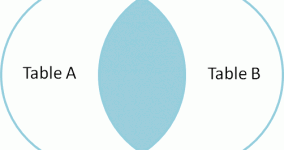
If you’re like me, you enjoy partaking in the occasional SQL JOIN. But after a while the straight vanilla JOIN gets a little old (not to mention that it’s not always necessarily the most efficient way of pulling records).
Thus I give you… A Visual Explanation of SQL JOINs
Enjoy, and use it well.
It’s been noticed lately, that when asked to perform mathematic operations on a very specific number (2.2250738585072011e-308 to be precise), PHP throws itself into an infinite loop.
tl;dr: If you’re running PHP on a 32-bit system, you’ll need make sure that your install has been compiled with the -ffloat-store flag. Otherwise, the PHP process will enter an infinite loop when you try to perform mathematic operations on the floating number 2.2250738585072011e-308.
According to Rick Regan (who posted the initial observation): (source)
2.2250738585072011e-308 represents the largest subnormal double-precision floating-point number; written as a hexadecimal floating-point constant, it’s 0×0.fffffffffffffp-1022. 2.2250738585072011e-308 is one of five 17-digit decimal values that convert (correctly) to 0×0.fffffffffffffp-1022:
2.2250738585072007e-308
2.2250738585072008e-308
2.2250738585072009e-308
2.2250738585072010e-308
2.2250738585072011e-308
Only 2.2250738585072011e-308 causes the problem. It happens to be the largest of the five decimal values, so I guess that matters somehow.
The PHP hacker community was quick to notice, and shortly after the article was posted had tracked down both the reason behind the errant behaviour, as well as the conditions under which said flaw exposes itself: (source)
This problem occurs due to IA-32′s 80-bit floating point arithmetic. The simple fix: add a “-ffloat-store” flag to your CFLAGS.
The problematic function, zend_strtod, seems to parse the mantissa (2.225…011 part) and the exponent (-308 part) separately, calculate the approximation of m*10^e and successively improve that approximation until the error becomes less than 0.5ulp. The problem is that this particular number causes the infinite loop (i.e. the iteration does not improve the error at all) in 80-bit FP, but does not in 64-bit FP. Since x86-64 in general uses the SSE2 instruction set (with 64-bit FP) instead of the deprecated x87 it does not have this problem.
Luckily my server here wasn’t affected.
This bug may very well have been around for a while, but it seems that the Google Voice plugin for browsers (Safari, Firefox, Chrome) is very possessive of its webcam.
If you have the Google Voice plugin installed on your machine and you attempt to go to a site with Flash that wants/needs to have access to your webcam, you’ll realize that it just doesn’t work. Flash will fail with any attempt to bind to the user’s camera.
I discovered this particular anomaly when I was resurrecting one of my old projects. Everything else played fine in the Flash unit, but when the user (in this case me) went to make their own video, the Flash just wouldn’t recognize the camera.
It’d been a while since I’d touched the flash code on that particular project so I started to second-guess myself… spending an entire night poring over old code, searching for the errant needle in the .as haystack. The next morning, while at work, I attempted to load the Flash site on my work machine. Lo and behold, the recording functionality worked just fine. I determined the difference between my personal MacBook Pro and my work machine was that my personal machine had the Google voice plugin installed. I uninstalled the plugin from my machine, went back to the problematic Flash site, and PRESTO! Flash was able to successfully connect to my webcam.
Thoughts on what it might be:
So, who’s to blame? Is this a Flash issue? Is this a Google Voice issue?
I’d put the onus on Google. In Flash, in order to capture and display video from a user’s webcam, you must call Camera.getCamera() (see here). This method then returns a Camera object. If there is no webcam, or the webcam is not available, the method will return null. I believe that Google Voice is somehow latching on to the webcam and just hanging out, all chill, in the background. Then along comes Flash, wanting to access the Camera, but seeing that Google Voice is already latched on to the camera, returns null.
In the meantime, if you want to uninstall the Google Talk plugin, you can find the uninstaller on your Mac at: /Library/Application Support/Google/GoogleVoiceAndVideoUninstaller
Here’s hoping that someone somewhere decides to do something about this.
Okay, bear with me… I discovered an edge-case bug today. One which, best I can gather, occurs only in Safari, with users running OSX 10.6 (Snow Leopard). After finally tracking down what the problem was, I was amazed that the bug wasn’t better documented… that my Google searches hadn’t been more fruitful. Ergo, I’ve written it down here, and left comments open… so, if you’ve experienced the bug & found a workaround, please PLEASE let me/us know below.
The Setup:
Create a page with two divs, vertically-stacked.
Write a Flash swf to the top div (using swfobject… or any other embed method),
Insert a google map (using Google’s v3 API for Javascript) in the bottom div.
Now… load the page up in your browser… then click and drag the map upwards (so as to reveal more southern content in the map)
If you’re running Apple OSX 10.6 and in Safari, you’ll notice that:
a.) your “hand” cursor quickly turns back to a normal “arrow” cursor.
b.) once you release the mouse button, the map is no longer draggable or clickable.
The map’s other navigation UI elements still work (i.e. you can use the controls to pan & zoom), but the map itself is completely unresponsive to mouse events.
Funny enough, you can use the UI to move the map north again, and actually re-enable mouse events on the map, but as soon as you drag south again, you’re hosed.
I just came across this buggery today, so unfortunately, I don’t have any workarounds yet. I’ve tried different Flash embed methods (SWFObject, Adobe’s old “AC” method, twice-baked), explicitly defining different z-indexes, but nothing seems to work yet.
For those not aware, in order to create dynamic display ads that don’t look like donkey poo, the developer needs to embed the font-outlines for any and all characters which MIGHT appear in the ad’s dynamic text areas (headline, call to action, etc). For standard North-American english, the Latin I characterset works just fine, and results in ~10k of the final swf size. This number is variable, depending on the complexity of the font, but I used Helvetica for my example.. for simplicity sake. Most western European languages (and French-Canadian) are easy enough to accomodate, just manually add a few more key characters to that characterset, and you’re good.
However, as it is now, it’s simply not feasible to embed asian characters in a Flash unit destined for use as a banner ad (even with rich-media bytesize allowances). Why? The sheer number of unique glyphs used by asian languages means that if we want to include all possible characters, we need to include the entire base characterset for that language, which for chinese, weighs in at a hefty ~2MB. Yes. Approximately two megabytes.
Powered by WordPress
Designed by Graph Paper Press